Spin It Just Became Your PE Assistant: The Free Spinner Wheel That Now Builds Itself
By Jarrod Robinson · July 8, 2026 · 6 min read
The free PE spinner wheel used by thousands of teachers is now a native iPhone app — with AI that builds any wheel from one sentence. Here's how to use it in your lessons.
You know the moment. You need someone to demonstrate a skill, collect the bibs, or answer a question — and suddenly thirty pairs of eyes find something fascinating on the gym floor. Random selection should be simple. It turns out, when you make fairness visible, everything changes.
A spinner wheel doesn't just pick a name — it turns the selection into theatre. Every student watches the wheel slow down, wondering if it will land on them. That suspense is free engagement, and nobody argues with the wheel. It's the most impartial referee in your gym bag.
Spin It has been a free spinner wheel for PE teachers on the web for years — and now it's a native iPhone and iPad app. The big news: type one sentence and the app builds your entire wheel in seconds using AI. Here's everything you need to know.
A Spinner Built for PE, Not Generic Use
Most spinner tools online are generic — cluttered with ads and built for trivia nights, not physical education. Spin It was built specifically for PE teachers. The moment you open it, there's already a ready-made Random Exercise wheel loaded with 23 bodyweight exercises — no setup, no typing, just spin.
The web version at spinitwheel.app remains completely free and works on any device, including interactive whiteboards. That never changes. The new iOS app takes everything further.
10 Ways PE Teachers Use a Spinner Wheel
Before we get to the AI magic, here's why the spinner wheel itself is one of the highest-leverage tools in your toolkit.
1. Instant Warm-Ups
Open Spin It, spin the default exercise wheel, and the whole class does the landed movement together. Spin again. Repeat for five minutes. Zero planning required — the wheel ships ready to go. Try this with AI: type "10 dynamic stretches for warm-up" and you have a custom wheel in seconds.
2. Fair Student Selection
Demonstrations, equipment collection, answering questions — load the class name list once and let the wheel decide. No accusations of favouritism, no awkward hovering over a student who's already answered three times. The wheel is the authority.
3. Fitness Station Rotation
Build a wheel with each station name and spin to decide the next rotation. Keeps the energy unpredictable and students alert — they genuinely don't know where they're heading next.
4. Skill of the Day
Dribbling hand, pass type, locomotor movement of the lesson — spin a skill-focus wheel at the start of class to set the theme. Students own the outcome because the wheel chose it, not the teacher.
5. Game Modifiers (Chaos Wheel)
Add challenge and novelty mid-game by spinning a modifier wheel: non-dominant hand, silent round, slow motion, everyone hops. Build this once with AI — "8 fun game modifiers for soccer" — and reuse it all season.
6. Team Colour and Equipment Allocation
Which team gets the blue bibs? Which zone does Group 3 defend? A quick spin removes the negotiation and gets you moving faster. Particularly useful at the start of tournament weeks.
7. Brain Breaks and Transitions
Spin a 30-second movement burst between activities — star jumps, freeze pose, everyone balances on one leg. Keeps the energy up during longer lesson segments without requiring a full activity switch.
8. Student Choice With Boundaries
Let students feel agency without giving up control. They choose from what's on the wheel — you chose what's on the wheel. Everyone wins. Great for differentiated tasks where all options are appropriate but students feel involved.
9. Exit Tickets and Reflection Prompts
Cool-down reflection becomes interactive when a question wheel is involved. "What was the hardest part of today?", "Name one thing you improved" — spin a question, pause, students answer in pairs. Beats everyone answering the same question at once.
10. Rewards and Friday Finishers
Build a fun wheel students have earned the right to spin — favourite warm-up, free choice station, class vs teacher challenge. The anticipation alone is motivating. Spin it once a week and watch Friday lessons become the most engaged of the week.
The Showstopper: AI That Builds Your Wheel From One Sentence
The old cost of spinner wheels wasn't spinning them — it was building them. Typing 15 exercises between lessons, one entry at a time, was enough friction that most teachers stuck to the same wheel forever.
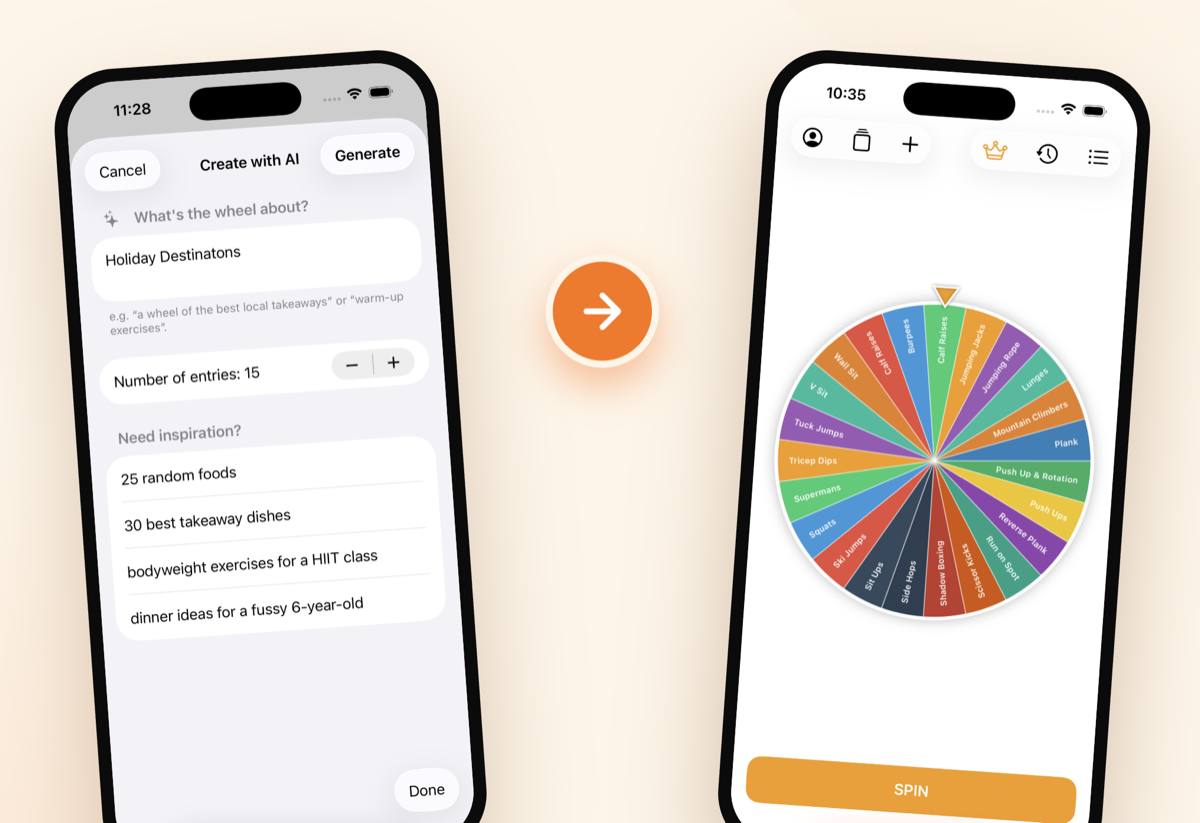
The new Spin It iOS app eliminates that entirely. Tap Create with AI, type what you want, hit Generate. A fully titled, ready-to-spin wheel appears in seconds.
💡 Try these PE prompts in the app
- "10 yoga poses for beginners"
- "8 partner balance challenges"
- "15 fitness station exercises"
- "12 warm-up exercises for a HIIT class"
- "8 stretches for a cool-down"
Each prompt generates a relevant, ready-to-use wheel — no editing required. Go back to any of the 10 use cases above: almost every one of them can be set up in under five seconds with a single typed prompt.
Web vs iOS — What Goes Where
| Feature | Web (spinitwheel.app) | iOS App |
|---|---|---|
| Price | Free | Free (optional upgrades) |
| Device | Any browser, tablet, IWB | iPhone & iPad |
| Offline use | Requires internet | Works fully offline ✓ |
| AI wheel creation | — | ✓ On-device AI |
| Syncs with web | ✓ | ✓ Sign in to sync |
| Interactive whiteboard | ✓ Best fit | Mirror via AirPlay |
| Sounds & haptics | Basic | Full native experience |
| Custom colours & branding | Optional upgrade | Optional upgrade |
The offline capability is a genuinely big deal for PE. Gym Wi-Fi is notoriously unreliable. With the iOS app, your wheels are on-device — no connection, no problem. Build everything at home on the couch, sign in, and it syncs to the gym for class.
Optional Upgrades for More
Spin It is free to use — web and iOS. There are optional upgrades available that unlock additional features including custom wheel colours, sounds, centre-logo branding, and unlimited entries. If you've already upgraded on the web, sign in on iOS and your upgrade carries across automatically.
Getting Started in 60 Seconds
- Web: Open spinitwheel.app — the default exercise wheel is already loaded. Hit Spin. Done.
- iOS: Download from the App Store (link below), open the app, spin the default wheel. Then tap Create with AI and try one prompt.
- Sync your wheels: Create a free account and your wheels follow you between phone, iPad, and web browser.
That's it. No lengthy setup, no imported spreadsheets, no tutorial required. The default wheel works from the first launch — and AI means your next custom wheel is one sentence away.
Try Spin It — Free
Free on the web and iOS. No account needed to spin.
Tags: Physical Education, Spin It Wheel, PE Technology, Student Engagement, PE Games, AI