How to Create PE Assessment Rubrics (With Free Templates)
By Jarrod Robinson · February 23, 2026 · 8 min read
Assessment rubrics don't have to take hours to build. Here's how to create effective PE rubrics — with free templates and an AI-powered shortcut that takes you from blank page to scoring students in under 60 seconds.
You know assessment is important. You know rubrics make assessment more consistent, more fair, and more useful for students.
But let’s be honest — how often do you actually use them?
For most PE teachers, creating assessment rubrics falls into the “I’ll get to that when I have time” category. And when report cards are due, you end up relying on memory and gut feel instead of structured data. Not because you don’t care — because building rubrics takes ages, and actually using them during a live PE lesson feels impossible.
It doesn’t have to be that way.
This guide walks you through everything you need to create effective PE assessment rubrics — what they are, why they matter, and how to build them. We’ve included free templates you can use straight away, plus a workflow that lets you create and score rubrics in under 60 seconds.
What Is a PE Assessment Rubric?
A rubric is a scoring guide that defines what performance looks like at different levels for a specific skill or behaviour. Instead of guessing whether a student is “good” or “needs improvement,” a rubric gives you clear criteria to assess against.
A typical PE rubric includes:
- Criteria — the specific skills or behaviours you’re assessing (e.g. serve technique, power and accuracy, consistency)
- Performance levels — usually 3–5 levels from beginning to advanced
- Descriptors — clear descriptions of what each level looks like in practice
Here’s an example. A tennis serve skill rubric might look like this:
| Criteria | Beginning | Developing | Proficient | Advanced |
|---|---|---|---|---|
| Serve Technique | Demonstrates minimal understanding of proper serve technique; inconsistent grip, stance, or motion. | Shows basic serve technique with some inconsistencies in grip, stance, or follow-through. | Executes serve with proper technique, including grip, stance, and follow-through, though refinement is needed for consistency. | Exhibits excellent serve technique with precision in grip, stance, motion, and follow-through, consistently delivering effective serves. |
| Power and Accuracy | Serves lack power and accuracy, often missing the service box. | Occasionally serves with moderate power and accuracy, but inconsistencies remain. | Demonstrates good serve power and accuracy, with most serves landing in the intended area. | Consistently delivers powerful and accurate serves, placing the ball strategically within the service box. |
| Consistency | Rarely performs consecutive successful serves; significant inconsistencies in performance. | Shows improvement in serve consistency, with intermittent effective serves. | Maintains consistent serve performance, successfully delivering consecutive serves with few errors. | Demonstrates an exceptional level of serve consistency, with minimal errors over extended play. |
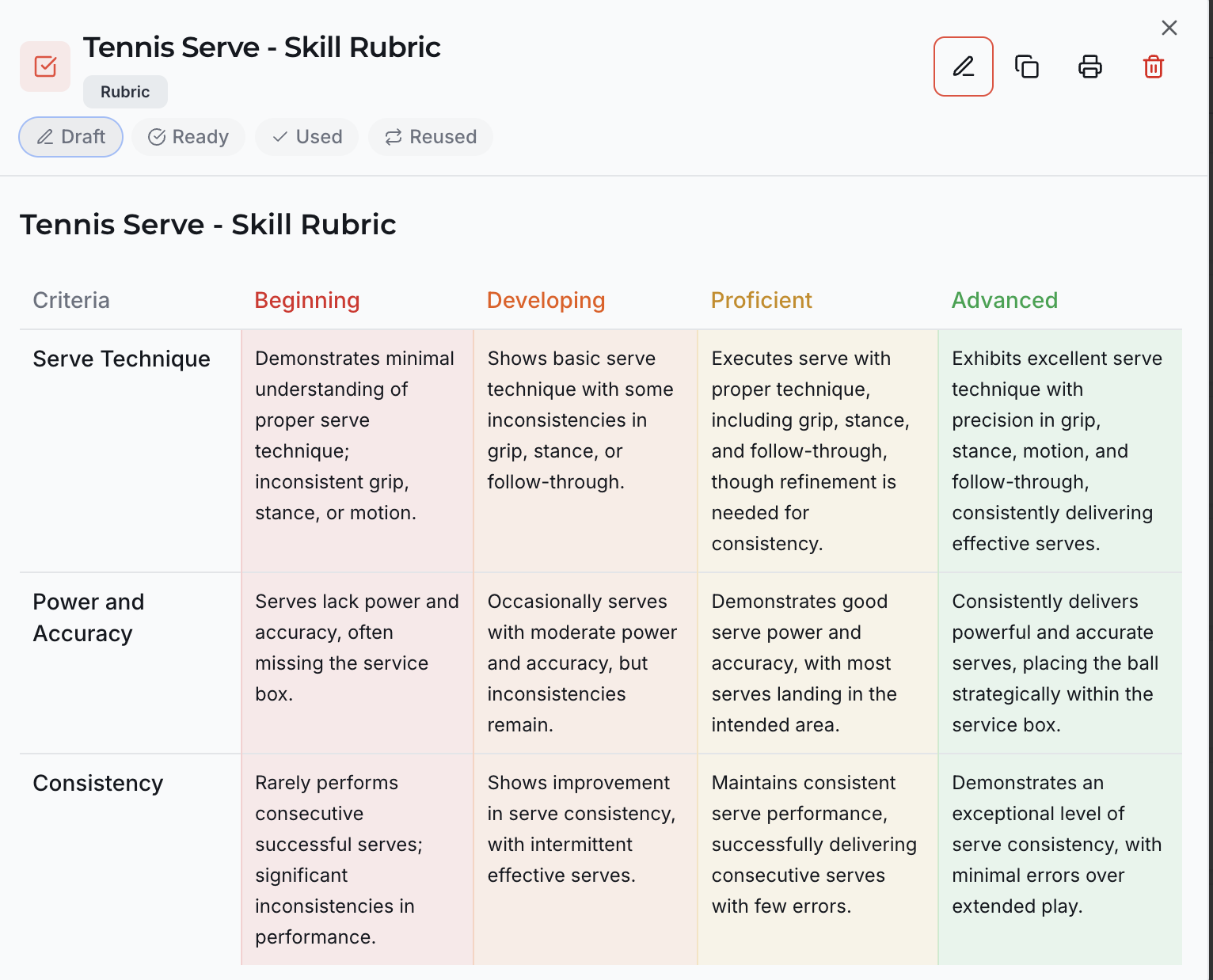
That’s a real rubric generated inside ConnectedPE — and it took about 10 seconds to create.
Why Rubrics Matter in PE
Rubrics aren’t just a reporting requirement. When used well, they fundamentally change how you teach and how students learn.
1. They Make Assessment Consistent
Without a rubric, scoring depends on who’s watching and when. Two teachers can watch the same student and give completely different marks. A rubric puts everyone on the same page — literally.
2. Students Know What “Good” Looks Like
When you share the rubric criteria before the activity, students understand exactly what they’re working towards. “Proficient in serve technique” isn’t vague when they can read the descriptor: “Executes serve with proper technique, including grip, stance, and follow-through.”
3. Feedback Becomes Specific
Instead of “good job” or “keep practising,” you can point to exactly where a student sits on the rubric and what the next level looks like. That’s actionable feedback — the kind that actually drives improvement.
4. You Can Track Progress Over Time
When rubric scores are recorded, you can see growth across a term or year. That data isn’t just useful for reports — it helps you plan better, identify students who need support, and demonstrate the impact of your program.
Types of PE Assessment Rubrics
Not all rubrics look the same. The type you choose depends on what you’re assessing and how much detail you need.
Skill Rubrics
Assess the quality of a specific movement or technique. Best for sport-specific skills like a tennis serve, basketball layup, or gymnastics routine. The tennis serve example above is a skill rubric.
Behaviour Rubrics
Assess effort, teamwork, sportsmanship, leadership — the non-skill elements that matter just as much. Useful for ongoing assessment throughout a term.
Fitness Rubrics
Assess performance in fitness activities or testing. Can include technique (e.g. running form) and effort (e.g. sustained work rate), not just test scores.
Game Play Rubrics
Assess tactical awareness, decision-making, and skill application during actual game situations. Harder to assess than isolated skills, which makes rubrics even more valuable here.
How to Create a PE Rubric (Step by Step)
Step 1: Choose Your Focus
What are you assessing? Pick one specific skill, behaviour, or activity. Trying to assess everything at once makes rubrics too complex to use.
Good examples:
- Basketball dribbling technique
- Teamwork during invasion games
- Swimming freestyle stroke
Step 2: Define Your Criteria (3–5 Max)
Break the skill down into its key components. Three criteria is ideal for in-class assessment — more than five becomes unmanageable.
For a basketball dribbling rubric, your criteria might be:
- Ball control
- Body position
- Speed and agility
Step 3: Set Your Performance Levels
Most PE rubrics use 4 levels. Common labels include:
- Beginning → Developing → Proficient → Advanced
- Emerging → Developing → Achieved → Excelling
- 1 → 2 → 3 → 4
Four levels give you enough range without splitting hairs. The key is that each level is clearly different from the next.
Step 4: Write Your Descriptors
This is the hardest part — and the part that takes the most time. Each cell needs to describe what that level actually looks like for that criterion. Good descriptors are:
- Observable — you can see it happening during the lesson
- Specific — not “good” or “needs improvement” but real behaviour descriptions
- Progressive — each level clearly builds on the one before it
Step 5: Test It
Use the rubric with a small group first. If you find yourself constantly hovering between levels or struggling to decide, the descriptors aren’t clear enough. Refine and try again.
Free PE Rubric Templates
Here are three ready-to-use rubric templates for common PE activities. Copy and adapt them for your own classes.
Template 1: Basketball Dribbling (Skill Rubric)
| Criteria | Beginning (1) | Developing (2) | Proficient (3) | Advanced (4) |
|---|---|---|---|---|
| Ball Control | Frequently loses control of the ball; uses palm instead of fingertips | Maintains control in stationary position but loses ball when moving | Controls ball consistently while moving at moderate pace | Controls ball at speed, through defenders, with either hand |
| Body Position | Stands upright with eyes on ball; limited awareness of surroundings | Beginning to lower stance; occasionally looks up from ball | Low athletic stance; head up with good court awareness | Low, balanced stance; eyes always up, reads the court |
| Change of Direction | Cannot dribble and change direction; stops to adjust | Can change direction slowly; ball moves ahead of body | Changes direction smoothly at moderate speed | Quick direction changes under pressure using crossovers and hesitation moves |
Template 2: Teamwork and Sportsmanship (Behaviour Rubric)
| Criteria | Beginning (1) | Developing (2) | Proficient (3) | Advanced (4) |
|---|---|---|---|---|
| Cooperation | Struggles to work with others; often works alone or disrupts group | Works with others when directed but limited contribution to team decisions | Actively contributes to team planning and shares ideas | Leads collaborative discussions and ensures all team members are included |
| Sportsmanship | Reacts negatively to losing or mistakes; blames others | Accepts outcomes but shows frustration; inconsistent encouragement of others | Handles winning and losing gracefully; encourages teammates | Models exceptional sportsmanship; motivates opponents and teammates alike |
| Communication | Rarely communicates with team during play | Uses basic communication (calling for ball, basic positioning) | Communicates clearly and consistently during game play | Directs team strategy, provides constructive feedback, adapts communication to the situation |
Template 3: Swimming Freestyle (Skill Rubric)
| Criteria | Beginning (1) | Developing (2) | Proficient (3) | Advanced (4) |
|---|---|---|---|---|
| Arm Stroke | Arms enter water flat with limited pull; no recovery above water | Overwater recovery present but inconsistent; limited pull strength | Smooth overwater recovery; strong pull with high elbow | Powerful, efficient stroke with full extension and high elbow recovery |
| Kick | Kicks from knees with large splash; minimal propulsion | Straighter legs but inconsistent rhythm; some propulsion | Steady flutter kick from hips; minimal splash | Strong, continuous flutter kick from hips; efficient and rhythmic |
| Breathing | Lifts head forward to breathe; disrupts body position | Turns head to side but timing is inconsistent; occasional water intake | Bilateral breathing with consistent timing; body position maintained | Effortless bilateral breathing; fully integrated into stroke rhythm |
The Faster Way: AI-Generated Rubrics in Seconds
Those templates above are useful — but they cover exactly three activities. What about gymnastics? Volleyball? Dance? Athletics? Tag games?
This is where most teachers get stuck. You need a rubric for your specific activity, your specific criteria, your specific year level — and writing one from scratch takes 20–30 minutes. Multiply that by every unit across the year, and it’s hours of work that never gets done.
Inside ConnectedPE, the Rubric Maker AI tool generates a complete, customised rubric in about 10 seconds.
Here’s the workflow:
1. Generate Your Rubric
Open the Rubric Maker, choose your activity, skill focus, and criteria, then hit Generate. You get a full rubric with descriptors across all levels — ready to use, edit, print, or share. No formatting, no descriptor-writing, no starting from a blank page.
2. Score Students During the Lesson
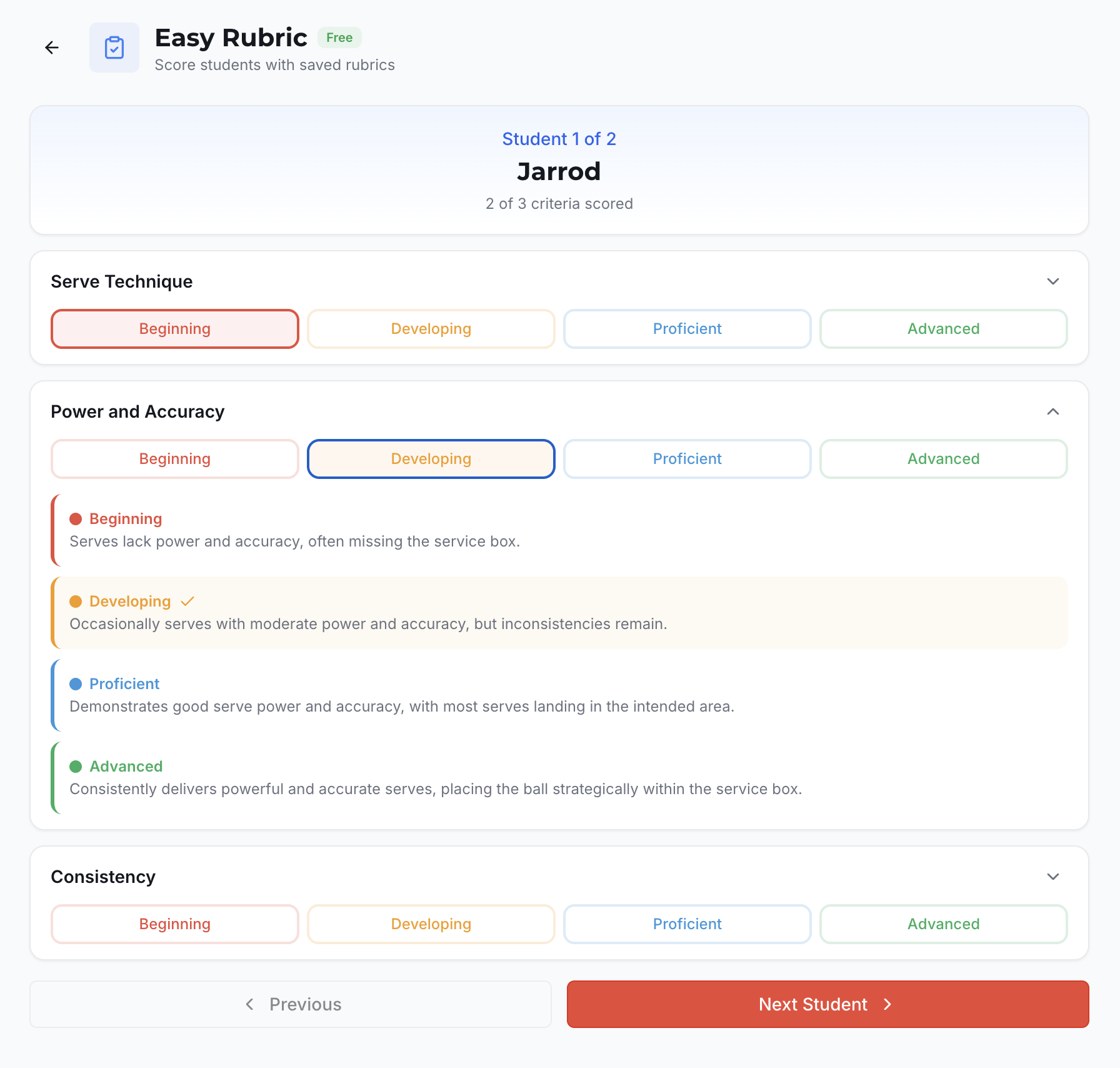
Open the Easy Rubric widget and your rubric is already loaded. Walk around with your phone, tap a student, select their level for each criterion, hit Next Student. You’re assessing an entire class while they’re still playing.
No clipboard. No printed rubric you forgot in the staffroom. No “I’ll do it from memory tonight.”
3. View Your Results
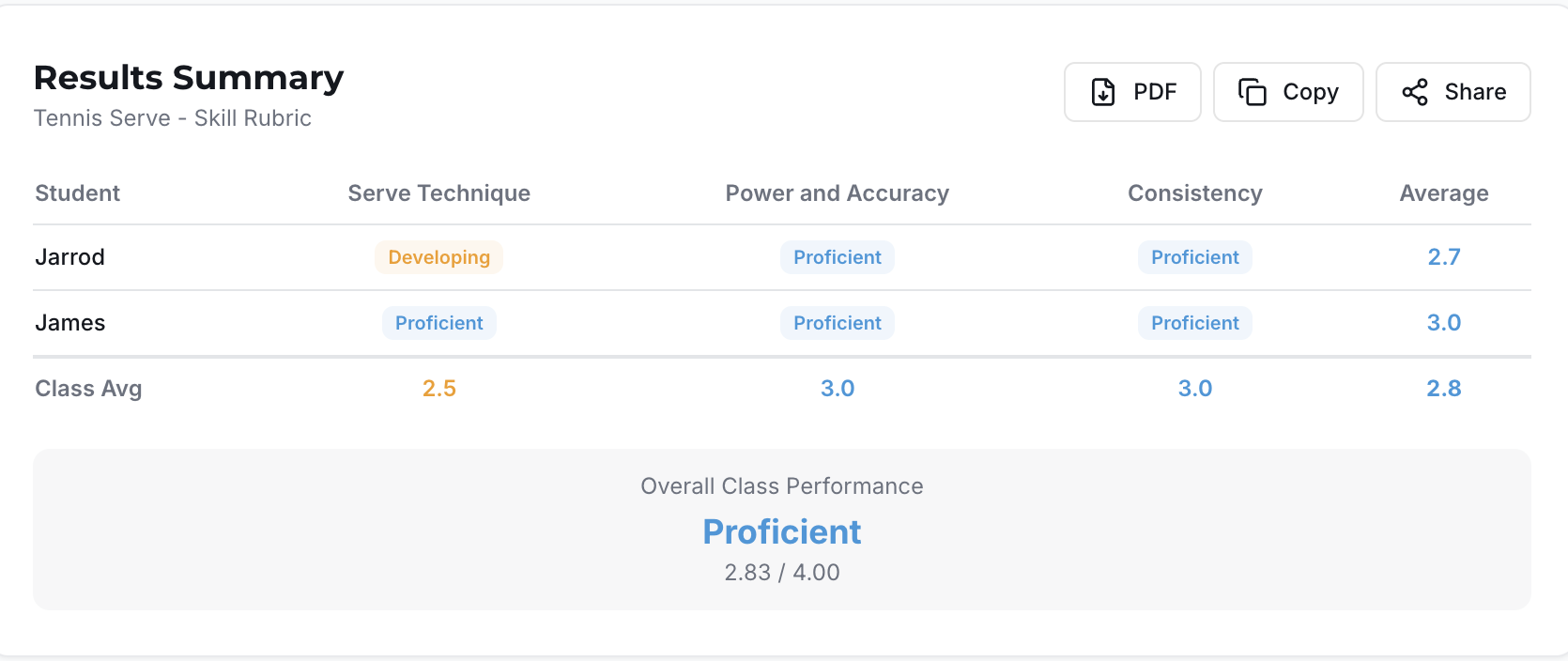
When you’re done, the Results Summary shows you exactly where each student landed — individual scores by criterion, class averages, and an overall performance level. Export as PDF, copy, or share.
The entire flow — from blank page to scored assessment data — takes under 60 seconds.
Getting Started (Free)
You can try this workflow right now, at no cost:
- Go to connectedpe.com and create your free account (30 seconds, no credit card)
- Open the Rubric Maker in the AI Tools section — your free credits let you generate rubrics straight away
- Open the Easy Rubric widget — this is a free tool, forever. Score students with any rubric you’ve created, as many times as you want
The Rubric Maker uses your free AI credits. The Easy Rubric widget for live scoring is completely free — no trial, no expiry.
Even if you never pay a cent, you still get a rubric scoring tool that works during every lesson, every term, every year.
Key Takeaways
- A good PE rubric has 3–5 criteria, 4 performance levels, and clear, observable descriptors
- Choose the right rubric type for what you’re assessing: skill, behaviour, fitness, or game play
- The hardest part is writing descriptors — use the templates above as a starting point
- For custom rubrics on any activity, ConnectedPE’s Rubric Maker generates them in seconds
- The Easy Rubric widget lets you score students during the lesson — not after
- Both tools are free to get started at connectedpe.com
Tags: Assessment, Rubrics, AI Tools, Free Templates, Physical Education